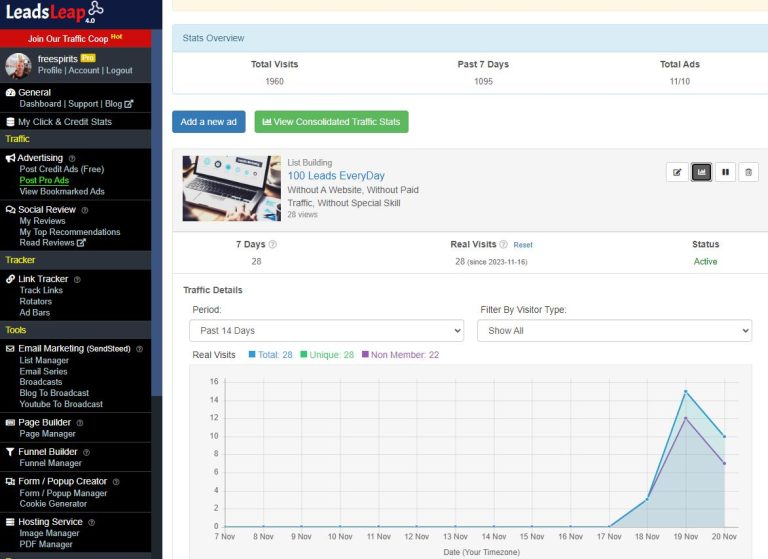
Как мне проанализировать свою LeadsLeap Статистика посещаемости?
Анализ статистики посещаемости на LeadsLeap имеет решающее значение для оптимизации ваших маркетинговых стратегий. Независимо от того, хотите ли вы повысить эффективность своей рекламы или улучшить вовлеченность аудитории, анализ данных о трафике может дать вам ценную информацию. Вот пошаговое руководство о том, как эффективно этого добиться.
Шаг 1: Перейдите в личный кабинет
Для начала войдите в свою Счет LeadsLeap. Как только вы окажетесь на панели управления, вы увидите пункт под названием ‘Статистика посещаемости’. Нажмите на него, чтобы подробнее ознакомиться с данными о посещаемости.
Шаг 2: Анализ источников трафика
На странице «Статистика трафика» вы увидите разбивку источников трафика. В этом разделе показано, откуда приходят ваши посетители — будь то органический поиск, переходы по ссылкам или платная реклама. Определение наиболее эффективных источников поможет вам понять, на чем следует сосредоточить свои усилия.
Шаг 3: Проанализируйте соотношение уникальных посетителей и общего числа посетителей
Очень важно понимать разницу между уникальными посетителями и общим количеством посетителей. Число уникальных посетителей показывает, сколько разных людей посещают вашу страницу, тогда как общее количество посетителей учитывает каждое посещение, включая повторные. Такой анализ поможет оценить эффективность ваших маркетинговых или рекламных мероприятий.
Шаг 4: Проверьте показатели кликабельности (CTR)
Далее вам следует проанализировать показатель кликабельности (CTR). Этот показатель измеряет, как часто пользователи нажимают на ваши объявления или ссылки по сравнению с тем, сколько раз они были показаны. Более высокий CTR, как правило, свидетельствует о привлекательности контента или рекламных объявлений. Если ваш CTR низкий, подумайте о пересмотре своих стратегий или креативного контента.
Шаг 5: Отслеживание коэффициентов конверсии
Коэффициент конверсии показывает, сколько посетителей совершили желаемое действие, например, подписались на рассылку или совершили покупку. Этот показатель имеет решающее значение для оценки эффективности ваших целевых страниц и общей маркетинговой стратегии. Если ваш коэффициент конверсии ниже ожидаемого, возможно, вам следует улучшить своё предложение или кнопки с призывом к действию.
Шаг 6: Использование инструментов аналитики
LeadsLeap предоставляет различные аналитические инструменты, которые помогут вам более глубоко изучить статистику посещаемости. Ознакомьтесь с инструментами, позволяющими анализировать динамику показателей во времени, демографические данные и поведение пользователей. Эти аналитические данные позволят применять более целенаправленные маркетинговые подходы и повысить вовлеченность аудитории.
Шаг 7: Примите меры
На основании результатов анализа примите конкретные меры по оптимизации ваших рекламных кампаний. Это может включать тестирование новых текстов рекламных объявлений, корректировку целевой демографической группы или увеличение бюджета на наиболее эффективные каналы.
Заключение
Анализ вашего LeadsLeap Статистика посещаемости предоставляет важную информацию, которая поможет повысить эффективность ваших маркетинговых мероприятий в Интернете. Следуя описанным шагам, вы сможете принимать обоснованные решения, направленные на увеличение посещаемости и повышение коэффициента конверсии.
Готовы приступить к действию и узнать больше об этой замечательной платформе? Нажмите здесь изучить LeadsLeap.
Кроме того, не забудьте скачать эти бесплатные отчеты, чтобы получить дополнительную информацию: