Video has become one of the most powerful ways to communicate online. Whether you are training employees, explaining a product, onboarding customers, or educating an audience, video helps people understand information faster and more clearly than text alone.
But there is one major problem with traditional video.
Most videos are passive.
A viewer clicks play, watches for a few seconds, maybe skips ahead, and then leaves. You do not always know what they understood, where they lost interest, or whether they took the next step. For businesses, educators, marketers, and training teams, that creates a major gap between content and results.
That is where interactive videos change everything.
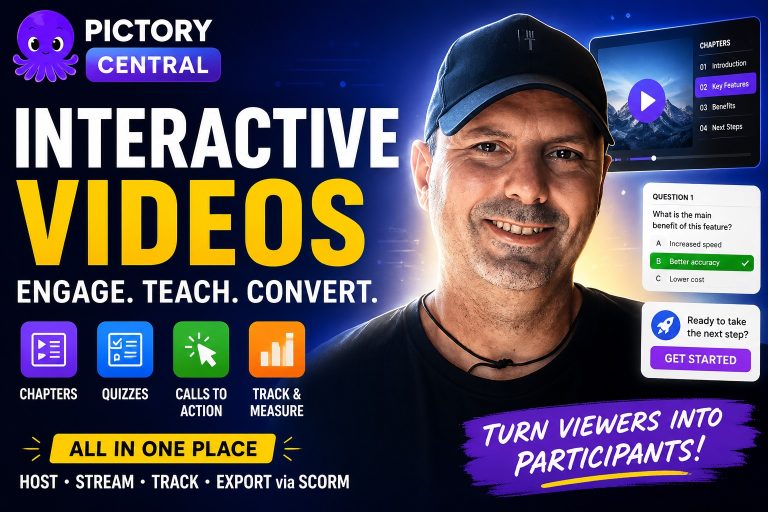
Con Victoria Central, you can create, host, stream, and track interactive videos in one place. Instead of simply asking viewers to watch, you can invite them to participate. You can add chapters, quizzes, clickable calls to action, and guided pathways directly inside your videos.
The result is a more engaging, measurable, and action-driven video experience.
Qué es Victoria Central?
Victoria Central is designed to be your central hub for interactive video content. It gives you one place to host, stream, organize, and track videos that do more than play from beginning to end.
Con Victoria Central, your videos can include:
Chapters
Chapters help viewers move through your content easily. Instead of forcing someone to watch a full video in a fixed order, you can let them jump to the section that matters most.
This is especially useful for training modules, product tutorials, onboarding walkthroughs, and long-form educational content.
Quizzes
Quizzes turn video into a learning experience. They help confirm whether viewers understand what they just watched, and they give you a clearer way to measure engagement and comprehension.
This is ideal for employee training, compliance education, customer education, and internal knowledge sharing.
Calls to Action
Calls to action guide viewers toward the next step. That might be booking a demo, exploring a product feature, completing a training checkpoint, contacting your team, or moving to the next lesson.
Instead of waiting until the end of a video, you can place action points exactly where they make the most sense.
Alojamiento, Streaming, and Tracking
Victoria Central also helps you manage the full video experience in one place. You do not need to create a video in one tool, host it somewhere else, and track performance in another system.
You can keep your interactive videos organized, stream them to your audience, and review engagement data from a single central platform.
SCORM Export
For teams that use learning management systems, SCORM export is a major benefit. It allows your interactive videos to fit into structured learning environments, making it easier to support employee training, course delivery, and measurable learning outcomes.
What Are Interactive Videos?
Interactive videos are videos that allow viewers to engage directly with the content.
Instead of only watching, viewers can click buttons, answer quiz questions, choose what they want to explore, and move through the video in a more personalized way.
This changes the role of the viewer.
They are no longer passive. They become active participants.
A standard video might show a product demo from start to finish. An interactive video can let the viewer choose which feature they want to learn about first.
A standard training video might explain a process and hope the learner remembers it. An interactive video can pause at key moments and ask a question to check understanding.
A standard onboarding video might walk through every setup step in the same order for everyone. An interactive video can guide each user based on what they need, where they are stuck, or what they want to complete next.
That is the real power of interactive video. It adapts to the viewer instead of forcing every viewer into the same experience.
Why Passive Video Is No Longer Enough
Traditional video still has value. It is simple, familiar, and easy to consume. But when you need viewers to learn, decide, remember, or act, passive video often falls short.
The challenge is that passive viewing does not always create deep engagement.
Someone can play a training video while multitasking. A prospect can watch a product demo but miss the feature that matters most. A new customer can watch an onboarding video and still feel unsure about what to do next.
Passive video also gives limited insight. You may know that someone clicked play, but that does not always tell you whether they understood the content, completed the key steps, or felt ready to move forward.
Interactive video solves this by creating moments of engagement throughout the viewing experience.
When a viewer clicks, answers, chooses, or navigates, they are paying closer attention. They are interacting with the content in a way that gives both them and you more value.
How Interactive Videos Improve Engagement
Engagement is not just about getting people to watch longer. It is about getting people involved.
Interactive videos help because they give viewers a reason to participate.
A chapter menu lets them control their learning journey. A quiz challenges them to think about what they just learned. A clickable button helps them explore what matters most to them. A call to action gives them a clear next step when their interest is highest.
This creates a better experience because the video feels less like a lecture and more like a conversation.
For businesses, this can lead to more meaningful outcomes. Employees can retain information more effectively. Prospects can discover the features that match their needs. Customers can move through onboarding with more confidence. Teams can track progress and identify where viewers may need extra support.
Use Case 1: Employee Training
Employee training is one of the strongest use cases for interactive videos.
Most organizations need to train employees on processes, policies, tools, safety procedures, compliance requirements, customer service standards, and internal workflows. But training content is only useful if employees actually understand it and can apply it.
Interactive videos make training more active.
Instead of asking employees to simply watch a training video, you can build scenarios where they make decisions along the way. For example, a customer service training video could present a realistic customer situation and ask the employee how they would respond. A safety training video could pause at key moments and ask the learner to identify the correct next step. A software training module could include checkpoints to confirm that the viewer understands each part of the process.
This creates a stronger learning experience because employees are not just receiving information. They are practicing, answering, and applying what they learn.
Quizzes also help managers and training teams measure outcomes. Rather than relying only on completion, you can see whether learners understood the material. That makes training more accountable and easier to improve over time.
And with SCORM export, interactive videos can fit into a formal learning management system, making them especially useful for organizations that already manage training programs through structured platforms.
Use Case 2: Product Demos
Product demos are another powerful place to use interactive video.
A traditional product demo usually follows one fixed path. It explains the product, highlights features, and ends with a call to action. But not every prospect cares about the same thing.
One buyer might want to see reporting features. Another might care about integrations. Another might be interested in ease of use. Another might want to understand pricing value or team workflows.
With an interactive product demo, prospects can choose the features they care about most.
That means you can personalize the experience without creating multiple separate videos for every audience segment. Instead of forcing every viewer through the same journey, you can let them click into the sections that match their needs.
This creates a better experience for the prospect and a smarter sales asset for your team.
Interactive product demos can also include calls to action at the right moments. When a prospect is watching a feature that solves their specific problem, you can invite them to book a demo, start a trial, contact sales, or learn more.
The timing matters. A well-placed call to action inside a video can feel natural because it appears when the viewer is already interested.
Use Case 3: Customer Onboarding
Customer onboarding can make or break the user experience.
When someone signs up for a product or service, they want to get value quickly. If they feel confused, overwhelmed, or unsure what to do next, they may lose momentum before they ever experience the full benefit of what you offer.
Interactive videos help new customers move through setup steps with more confidence.
Instead of giving them a long tutorial and hoping they follow along, you can guide them step by step. You can add embedded checkpoints to confirm they completed important actions. You can use chapters so they can revisit specific setup stages. You can include calls to action that direct them to the next video, resource, or support option.
This makes onboarding feel more supportive and less overwhelming.
For example, a customer onboarding video could guide a new user through account setup, profile configuration, dashboard navigation, and first project creation. After each step, the video could ask whether the user has completed the action or needs help. If they need help, they can be guided to the right section or support path.
That kind of experience helps prevent users from getting stuck.
It also reduces pressure on support teams because customers can find answers inside the onboarding flow itself.
Why Chapters Matter in Interactive Videos
Chapters may seem simple, but they can dramatically improve the usability of a video.
People often come to a video with a specific question. They may not want to watch every second from beginning to end. If they cannot quickly find what they need, they may leave.
Chapters solve this problem by making video easier to navigate.
For training, chapters help learners revisit specific lessons. For demos, chapters help prospects jump to the feature they care about. For onboarding, chapters help users return to a setup step without rewatching the entire video.
This improves the viewer experience and makes your content feel more useful.
Chapters also make longer videos less intimidating. A 20-minute video can feel overwhelming. But a 20-minute video broken into clear sections feels much easier to explore.
Why Quizzes Make Video More Effective
Quizzes are one of the most valuable interactive video features because they turn attention into action.
When someone knows they may be asked a question, they are more likely to focus. When they answer a question, they actively process the information. When they receive feedback or move forward after a checkpoint, the learning experience becomes more structured.
This is especially important for training and education.
Quizzes can help you identify whether viewers understand the material, where they may be struggling, and which parts of the video may need improvement.
For businesses, that means better visibility. For learners, it means better retention and confidence.
A quiz does not need to be complicated. Even a simple question at the right moment can make a video more engaging and useful.
Why Calls to Action Are Essential
A video without a call to action often leaves viewers wondering what to do next.
That is a missed opportunity.
Calls to action help turn attention into measurable results. They guide the viewer from interest to action.
Depending on the goal of your video, a call to action could invite viewers to:
- Start a free trial
- Book a product demo
- Complete a training module
- Continue to the next lesson
- Contact your team
- Explore a specific feature
- Download a resource
- Visit a support page
- Confirm they completed a setup step
The key is to place calls to action where they feel helpful, not disruptive. Interactive video allows you to do exactly that.
Instead of waiting until the very end, you can add action points throughout the viewing experience. This is especially valuable because viewer intent can be highest while they are actively watching a relevant section.
Why Tracking Matters
Creating video content is only part of the job. To improve results, you need to know how people interact with that content.
Victoria Central helps by giving you a place to track your interactive videos.
Tracking can help you understand how viewers move through content, where they engage, and which parts of the experience may need improvement.
For training teams, this can support better learning outcomes. For marketing teams, it can help improve demo performance. For customer success teams, it can reveal where users may be getting stuck during onboarding.
Without tracking, you are guessing. With tracking, you can refine your content based on actual viewer behavior.
The Bigger Opportunity: Personalized Video Experiences
The future of video is not just about better visuals. It is about better experiences.
People expect content to be relevant, easy to navigate, and useful. They do not want to sit through information that does not apply to them. They want control. They want clarity. They want the next step to be obvious.
Interactive videos meet that expectation.
They allow one video to serve different types of viewers. They help businesses communicate more effectively. They give learners and customers more confidence. They help prospects explore at their own pace.
And when you can create, host, stream, track, and export these experiences from one central place, the entire workflow becomes much easier to manage.
That is what makes Victoria Central valuable. It is not just about adding buttons to a video. It is about turning video into a more strategic tool for engagement, education, and conversion.
Quién debe utilizarlo Victoria Central?
Victoria Central is especially useful for teams that rely on video to educate, persuade, or guide an audience.
That includes:
- Learning and development teams creating employee training
- HR teams building onboarding and compliance content
- Marketing teams creating product demos and lead generation videos
- Sales teams personalizing the buyer journey
- Customer success teams improving user onboarding
- Product teams explaining features and workflows
- Coaches, consultants, and educators creating guided learning content
Any time you need someone to understand something, remember something, or take action, interactive video can make the experience stronger.
Turn Your Videos Into Experiences
Video is already one of the most effective ways to communicate. But interactive video takes it further.
It gives your audience control. It helps them learn by doing. It guides them toward the information that matters most. It turns passive viewers into active participants.
Con Victoria Central, you can create interactive videos with chapters, quizzes, and calls to action, then host, stream, track, and even export them via SCORM.
Whether you are training employees, demonstrating your product, or onboarding customers, Victoria Central helps you create video experiences that are more engaging, more measurable, and more useful.
The next time you create a video, do not just ask your audience to watch.
Invite them to interact.
Use chapters to guide them. Use quizzes to reinforce learning. Use calls to action to move them forward. And use Victoria Central to manage the entire experience in one place.
Because when your videos become interactive, your viewers become more than viewers.
They become participants, learners, prospects, and customers who are ready to take the next step.
#InteractiveVideo #VideoMarketing #EmployeeTraining