
Inhaltsübersicht
- Einführung
- 1. KI-gestützte Motiverkennung für Fotos
- 2. Automatische Hintergrundunschärfe mit KI
- 3. Vergleiche: KI-Unschärfe vs. herkömmliche Methoden
- 4. Praktische Anwendungsbeispiele aus den Bereichen Marketing und Lead-Generierung
- 5. Tools und Plattformen mit KI-basierter Unschärfe und Motiverkennung
- 6. Bewährte Verfahren für Qualität und Compliance
- Häufig gestellte Fragen
- Schlussfolgerung
Einführung
Was versteht man unter KI-gestützter Objekterkennung?
KI-gestützte Objekterkennung nutzt Computer Vision, um wichtige Elemente in einem Bild zu erkennen, wie beispielsweise Personen, Objekte oder Szenen. Es trennt den Vordergrund vom Hintergrund, sodass Sie jeden Bereich separat bearbeiten können. Dies ermöglicht eine präzise und schnelle Isolierung des Hauptmotivs.
Mit dieser Technologie können Sie schnell ein Motiv auswählen und Effekte anwenden, die die Schärfe, die Farbe oder die Tiefe verbessern – ganz ohne manuelles Nachzeichnen. Die Technologie unterstützt die Bearbeitung mehrerer Objekte gleichzeitig und trägt dazu bei, die Einheitlichkeit innerhalb eines Projekts zu gewährleisten.
Warum Hintergründe mit KI unscharf machen?
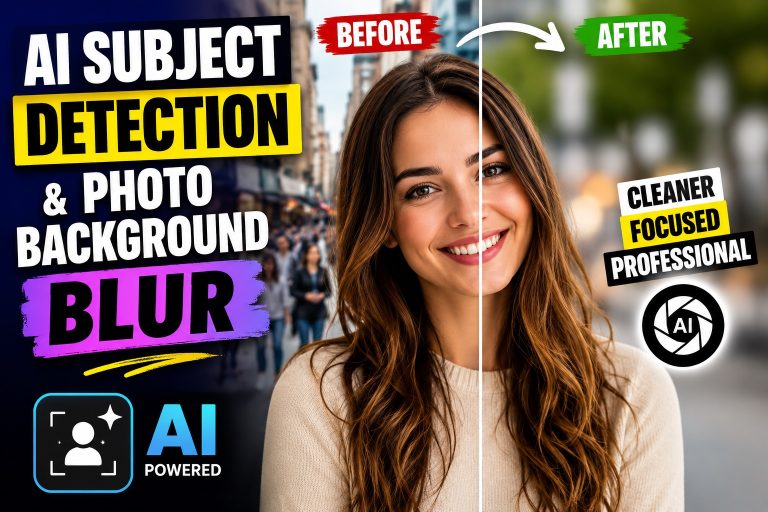
Das Unscharfzeichnen des Hintergrunds mithilfe von KI sorgt für ein professionelles Erscheinungsbild, indem eine geringe Schärfentiefe simuliert wird. Das Motiv bleibt scharf, während die Umgebung weichgezeichnet wird, wodurch die Aufmerksamkeit genau dorthin gelenkt wird, wo Sie es beabsichtigen.
Die KI-gestützte Unschärfe liefert schnelle, reproduzierbare Ergebnisse und passt sich unterschiedlichen Bildkompositionen an. Sie eignet sich für Produktfotos Fotos, Porträtfotos und Marketingbilder, ohne dass dafür komplexe Arbeitsabläufe erforderlich sind.
1. KI-gestützte Objekterkennung für Fotos
Wie KI Motive in Bildern erkennt
Die KI untersucht visuelle Merkmale wie Kanten, Texturen und Farbkonsistenz, um den Vordergrund vom Hintergrund zu trennen. Sie analysiert das gesamte Bild, um Elemente wie Personen, Objekte oder Szenen zu erkennen, die scharf bleiben sollen. Anschließend erstellt das System eine Maske, die den Motivbereich für die fokussierte Bearbeitung festlegt.
Fortgeschrittene Modelle nutzen kontextbezogene Hinweise, um mehrere Motive innerhalb eines Bildausschnitts zu unterscheiden, und ermöglichen so gezielte Bearbeitungen für jedes Element im Vordergrund. Dies hilft dabei, ein oder mehrere Motive ohne manuelles Nachzeichnen herauszulösen.
Genauigkeit und Randfälle bei der Objekterkennung
Die Genauigkeit hängt von der Komplexität des Bildes ab. Scharfe Porträts mit deutlichem Kontrast zwischen Motiv und Hintergrund Ertrag Gute Ergebnisse. Bei unruhigen Hintergründen oder Silhouetten sind unter Umständen Nachbearbeitungen erforderlich.
Das Entfernen von Objekten aus Fotos war noch nie so einfach und schnell. Zu den Sonderfällen zählen sich überlappende Motive, durchscheinende Materialien oder Motive, die mit dem Hintergrund verschmelzen. In diesen Fällen können Sie mithilfe der KI-gestützten Auswahl Punkte am Motiv anpassen, um die Abtrennung zu verbessern.
2. Automatische Hintergrundunschärfe mit KI
Wie KI unscharfe Bereiche ermittelt
Die KI nutzt den erkannten Vordergrund, um zu entscheiden, welche Hintergrundbereiche in den Hintergrund rücken sollen. Sie analysiert Kanten und Texturen, um das Motiv von den umgebenden Elementen zu trennen, und wendet auf diese Bereiche eine Gaußsche oder ähnliche Unschärfe an. Das Ergebnis ist eine natürliche Trennung, bei der das Motiv scharf bleibt, während der Hintergrund weicher wird.
Einstellung der Unschärfeintensität und der Schärfentiefe
Passen Sie die Stärke der Unschärfe an die jeweilige Szene an. Eine leichte Unschärfe bewahrt mehr Details im Hintergrund, während eine stärkere Unschärfe die Tiefenschärfe betont. Mit einigen Werkzeugen können Sie Tiefenhinweise basierend auf der Entfernung voreinstellen oder den Unschärferadius und die Glätte des Übergangs feinabstimmen, um Halos zu vermeiden.
- Durch die intelligente Bereichsausdehnung werden harte Kanten zwischen Motiv und Hintergrund gemildert.
- Mit Farbverläufen lässt sich das Bokeh einer echten Kamera ohne aufwendige Bearbeitung nachahmen.
- Separate Optionen für die Schärfe im Vordergrund sorgen dafür, dass feine Details wie Haarsträhnen oder Schmuck erhalten bleiben.
3. Vergleiche: KI-Unschärfe vs. herkömmliche Methoden
Vorteile der KI-Unschärfe gegenüber der manuellen Auswahl
Die KI-gestützte Unschärfeoptimierung vereinfacht die Isolierung des Motivs und die Weichzeichnung des Hintergrunds bei minimalem manuellem Nachzeichnen. Sie verarbeitet feine Details wie Haarsträhnen und durchscheinende Falten effizienter als manuelle Verfahren.
Die automatische Bereichserkennung reduziert das Ausprobieren und liefert einheitliche Ergebnisse bei großen Bildersätzen. Dies ist besonders hilfreich bei der Stapelbearbeitung im Rahmen von Kampagnen.
- Schnellere Bearbeitung bei Produktfotos und Porträtfotos
- Geringeres Risiko von Lichthöfen oder gezackten Rändern um das Motiv herum
- Tiefenhinweise, die einer echten Schärfentiefe ähneln
Einschränkungen und wann man sich für herkömmliche Werkzeuge entscheiden sollte
Die KI-Unschärfefunktion kann bei überfüllten Szenen oder wenn sich das Motiv mit dem Hintergrund vermischt, Schwierigkeiten bereiten, sodass möglicherweise manuelle Anpassungen erforderlich sind.
Für eine präzise Steuerung der Kantenbearbeitung, der Farbmaskierung oder benutzerdefinierter Weichzeichnungsformen bieten herkömmliche Werkzeuge taktile Einstellmöglichkeiten und pixelgenaue Masken.
- Präzision bei Kanten in komplexen Verbundwerkstoffen
- Benutzerdefinierte Unschärfe-Profile und künstlerische Effekte, die von automatisierten Tools nicht abgedeckt werden
- Ungewöhnliche Beleuchtungsszenarien, bei denen eine manuelle Feinabstimmung zu mehr Realismus führt
4. Praktische Anwendungsbeispiele aus den Bereichen Marketing und Lead-Generierung
Produktfotografie und Anzeigen
Dank KI-gestützter Objekterkennung und Hintergrundunschärfe kommen Produktfotos auf Bildschirmen besonders gut zur Geltung. Durch die Isolierung des Produkts bei gleichzeitiger Weichzeichnung des Hintergrunds entstehen klare Bilder, die sich nahtlos in Kataloge und Anzeigen integrieren lassen. Dieser Ansatz reduziert den Zeitaufwand für die Bildbearbeitung und sorgt für eine einheitliche Tiefenwahrnehmung über alle Bilder hinweg.
Marketingfachleute können schnell Varianten für Kampagnen erstellen. Sie können Hintergründe austauschen, Farbkontraste testen und das Produkt im Vordergrund scharf in den Fokus rücken, um einen einheitlichen Markenauftritt zu gewährleisten. Diese Strategien sind Teil wertvoller Anwendungsfälle im Marketing und im Branding.
Profilbilder und Bildmaterial für die Kundenakquise
Profil Fotos Profitieren Sie von scharf abgebildeten Motiven vor einem unscharfen Hintergrund. Mit dieser Technik lassen sich Porträtfotos erstellen, die sich für LinkedIn, Unternehmenswebsites oder Marketingmaterialien eignen – ganz ohne teure Studioaufbauten.
Für Ihre Öffentlichkeitsarbeit können Sie teamübergreifend einheitliche visuelle Elemente erstellen. Eine einheitliche Hervorhebung des Themas und Gestaltung des Hintergrunds steigert den Wiedererkennungswert und das Vertrauen in E-Mail-Kampagnen und Präsentationsunterlagen.
- Schnellere Umsetzung von Katalogaktualisierungen und Beiträgen in sozialen Medien
- Geringere Produktionskosten im Vergleich zu herkömmlichen Studiobearbeitungen
- Bessere visuelle Einheitlichkeit über alle Marketingkanäle hinweg
5. Tools und Plattformen mit KI-basierter Unschärfe und Motiverkennung
Übersicht über führende Lösungen
Viele Plattformen kombinieren mittlerweile KI-gestützte Motiverkennung mit Hintergrundunschärfe, um die Bildbearbeitung zu beschleunigen. Es gibt sowohl umfassende Bearbeitungsprogramme, die automatische Motivisolierung mit Unschärfe-Werkzeugen verbinden, als auch spezielle Funktionen, die auf eine schnelle optische Optimierung ausgerichtet sind.
Die verschiedenen Lösungen unterscheiden sich hinsichtlich Benutzerfreundlichkeit, Geräteunterstützung und Exportoptionen. Einige Optionen eignen sich für Einzelkreative, die mit Mobilgeräten arbeiten, andere unterstützen Teams, die eine Stapelverarbeitung und Markenkonsistenz benötigen. Legen Sie den Schwerpunkt auf Formate wie JPG, PNG, TIFF und HEIC sowie auf Arbeitsabläufe, die geräteübergreifend reibungslos funktionieren.
Zu bewertende Hauptmerkmale
- Automatische Motiverkennung mit einstellbaren Verfeinerungspunkten
- Intelligente Hintergrundunschärfe mit einstellbarer Stärke und Tiefenhinweisen
- Kantenbearbeitung zur Minimierung von Lichthofeffekten um feine Details herum
- Unterstützung der Stapelverarbeitung für große Bildersammlungen
- Exportoptionen für verschiedene Formate und Auflösungen für Web und Druck
- Datenschutzmaßnahmen und lokale Verarbeitung im Vergleich zur Cloud-Verarbeitung
| Merkmal | Worauf Sie achten sollten | Auswirkungen |
|---|---|---|
| Objekterkennung mittels KI | Präzision bei unterschiedlichen Lichtverhältnissen und komplexen Hintergründen | Bessere Schärfe im Vordergrund bei weniger manuellen Anpassungen |
| Einstellung der Hintergrundunschärfe | Einstellbarer Unschärferadius, Tiefenhinweise, Kantenübergänge | Realistische Trennung ohne Artefakte |
| Verfügbarkeit der Plattform | Web, iOS, Android, Desktop-Integration | Flexible, geräteübergreifende Arbeitsabläufe |
| Ausgabeformate | Unterstützung für JPG, PNG, HEIC, TIFF und WEBP | Einfache Veröffentlichung und Wiederverwendung |
6. Bewährte Verfahren für Qualität und Compliance
Für ein natürliches Aussehen sorgen
Streben Sie eine saubere Motivisolierung mit dezenten Rändern an, um Halos zu vermeiden und die Textur zu erhalten. Wenn Sie sich unsicher sind, probieren Sie verschiedene Weichzeichnungsstärken an einer kleinen Auswahl aus, um eine Einstellung zu finden, die natürlich wirkt.
Passen Sie die Tiefenhinweise an die Szene an. Bevorzugen Sie sanfte Übergänge, um einen realistischen Fokus nachzuahmen und visuelle Ablenkungen zu minimieren. Passen Sie die Kantenbearbeitung fein an, um Details wie Haare und Schmuck erhalten zu bleiben.
Datenschutz und ethische Überlegungen
Achten Sie bei der Bearbeitung von Porträts oder persönlichen Bildern auf die Einwilligung der betroffenen Person. Ist die Einwilligung unklar, vermeiden Sie es, erkennbare Merkmale zu verändern oder die Bilder in einer Weise zu verbreiten, die das Motiv in einem falschen Licht erscheinen lassen könnte.
Halten Sie sich an die Marken- und Inhaltsrichtlinien. Achten Sie bei Marketinggrafiken darauf, dass die Hintergrundgestaltung keine wesentlichen Informationen verdeckt oder die dargestellte Szene verzerrt.
Häufig gestellte Fragen
Wie kann ich meinen Hintergrund effektiv unscharf machen?
Beginnen Sie mit einer präzisen Motivisolierung, um Halos zu minimieren und Texturen zu erhalten. Passen Sie die Unschärfestärke an, um einen realistischen Tiefeneindruck zu erzeugen, bei dem wichtige Details erhalten bleiben. Falls möglich, stellen Sie den Fokuspunkt fein ein, um den gewünschten Vordergrund hervorzuheben.
Kann ich auf dem Handy Hintergründe unscharf machen?
Ja. Viele KI-Weichzeichnungs-Tools sind als mobile Apps oder Web-Editoren verfügbar. Achten Sie auf Funktionen wie Echtzeit-Vorschau, einstellbare Weichzeichnungsstufen und praktische Formate zum Teilen in sozialen Netzwerken.
Welche Faktoren beeinflussen die Qualität der KI-Unschärfe?
Zu den entscheidenden Faktoren zählen die Kantenschärfe, realistische Tiefenhinweise und die Vermeidung von Artefakten bei feinen Details wie beispielsweise Haaren. Der Verarbeitungsmodus und die Exportoptionen können die Geschwindigkeit sowie den Grad der Detailerhaltung beeinflussen.
Eignet sich der KI-Weichzeichner für alle Bilder?
Die KI-Unschärfefunktion eignet sich gut für Porträts und Produktfotos mit einem klar definierten Motiv. Bei Motiven ohne eindeutiges Motiv oder mit sehr komplexen Hintergründen kann es jedoch zu Schwierigkeiten kommen, sodass unter Umständen manuelle Anpassungen erforderlich sind.
Schlussfolgerung
Zusammenfassung der Vorteile
Die KI-gestützte Motiverkennung und die automatische Hintergrundunschärfe optimieren den Bearbeitungsablauf und sorgen für eine klare Motivisolierung sowie Tiefenhinweise – ganz ohne spezielle Ausrüstung.
Für Marketingmaterialien gewährleistet dieser Ansatz eine gleichbleibende Schärfe im Vordergrund und flexible Exportmöglichkeiten für Web und Print, die sich von einzelnen Bildern bis hin zu großen Stapeln skalieren lassen.
Zukünftige Trends in der KI-basierten Bildbearbeitung
Mit der Weiterentwicklung der Modelle sind Verbesserungen bei der Kantenbearbeitung und der Reduzierung von Halos zu erwarten. Echtzeit-Vorschauen auf Mobilgeräten werden den Iterationsprozess für Social-Media-Inhalte und Werbegrafiken beschleunigen.
Datenschutzaspekte und die Verarbeitung auf dem Gerät selbst werden für Teams, die mit sensiblen Bildmaterialien arbeiten, zunehmend an Bedeutung gewinnen. Zu erwarten sind eine engere Integration in bestehende Design-Tools und eine präzisere Steuerung der Tiefenhinweise, um den kreativen Absichten gerecht zu werden.
Referenzen
- Hintergründe mit KI in Sekundenschnelle unscharf machen
- Bildhintergrund verwischen – remove.bg
- Kostenloses Tool zum Unscharfmachen des Hintergrunds – Fotohintergrund online unscharf machen
- Kostenloses Tool zum Weichzeichnen des Hintergrunds
- Hintergrund online unscharf machen – Kostenloses Tool zum Unscharfmachen des Hintergrunds