
Table des matières
- Introduction
- 1. Détection de sujets dans les photos grâce à l'IA
- 2. Flou d'arrière-plan automatique grâce à l'IA
- 3. Comparaisons : flou généré par l'IA vs méthodes traditionnelles
- 4. Cas d'utilisation concrets dans le domaine du marketing et de la génération de prospects
- 5. Outils et plateformes proposant des fonctionnalités de floutage par IA et de détection de sujets
- 6. Bonnes pratiques en matière de qualité et de conformité
- FAQ
- Conclusion
Introduction
Qu'est-ce que la détection d'objets basée sur l'IA ?
Détection de sujets grâce à l'IA utilise la vision par ordinateur pour identifier les éléments clés d'une image, tels que des personnes, des objets ou des scènes. Il sépare le premier plan de l'arrière-plan afin que vous puissiez retoucher chaque zone indépendamment. Cela permet d'isoler le sujet principal avec précision et rapidité.
Grâce à cette technologie, vous pouvez sélectionner rapidement un sujet et appliquer des effets qui améliorent la netteté, les couleurs ou la profondeur, sans avoir à le tracer manuellement. Elle prend en charge les modifications par lots et permet de garantir la cohérence tout au long d'un projet.
Pourquoi flouter les arrière-plans grâce à l'IA ?
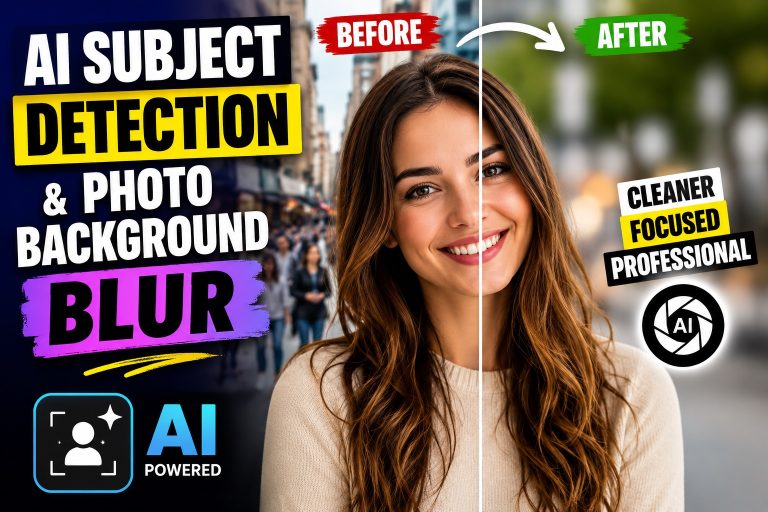
Le flou d'arrière-plan généré par l'IA permet d'obtenir un rendu soigné en simulant une faible profondeur de champ. Le sujet reste net tandis que l'arrière-plan s'estompe, ce qui permet d'attirer l'attention exactement là où vous le souhaitez.
Le flou généré par l'IA offre des résultats rapides et reproductibles, et s'adapte à différentes compositions d'images. Il convient particulièrement aux produits photos, des portraits et des visuels marketing sans nécessiter de processus de travail complexes.
1. Détection d'objets basée sur l'IA pour Photos
Comment l'IA identifie les sujets dans les images
L'IA examine des indices visuels tels que les contours, les textures et l'uniformité des couleurs afin de distinguer le premier plan de l'arrière-plan. Elle analyse l'image dans son intégralité pour repérer les éléments, tels que les personnes, les objets ou les scènes, qui doivent rester nets. Le système génère ensuite un masque qui délimite la zone du sujet sur laquelle le traitement de la mise au point doit se concentrer.
Les modèles avancés exploitent des indices contextuels pour distinguer plusieurs sujets au sein d'un même cadre, ce qui permet d'effectuer des retouches ciblées sur chaque élément au premier plan. Cela permet d'isoler un ou plusieurs sujets sans avoir à les tracer manuellement.
Précision et cas limites dans la détection d'objets
La précision dépend de la complexité de l'image. Portraits nets présentant un contraste marqué entre le sujet et l'arrière-plan rendement des résultats convaincants. Les arrière-plans chargés ou les silhouettes peuvent nécessiter quelques retouches.
Supprimer des objets d'une photo n'a jamais été aussi simple ni aussi rapide. Parmi les cas particuliers, on peut citer les sujets qui se chevauchent, les matériaux translucides ou les sujets qui se fondent dans l'arrière-plan. Dans ces situations, la sélection assistée par IA vous permet d'ajuster les points sur le sujet afin d'améliorer la séparation.
2. Flou d'arrière-plan automatique grâce à l'IA
Comment l'IA détermine les zones floues
L'IA utilise le premier plan détecté pour déterminer quelles zones de l'arrière-plan doivent être estompées. Elle analyse les contours et la texture afin de séparer le sujet des éléments environnants, puis applique un flou gaussien ou similaire à ces zones. Il en résulte une séparation naturelle : le sujet reste net tandis que l'arrière-plan s'estompe.
Réglage de l'intensité du flou et de la profondeur de champ
Réglez l'intensité du flou en fonction de la scène. Un flou léger permet de conserver davantage de détails en arrière-plan, tandis qu'un flou plus prononcé met en valeur la profondeur de champ. Certains outils vous permettent de définir des repères de profondeur prédéfinis en fonction de la distance ou d'ajuster avec précision le rayon de flou et la fluidité de la transition afin d'éviter les halos.
- La technique d'étalement intelligent des zones atténue les contours trop marqués entre le sujet et l'arrière-plan.
- Les dégradés permettent de reproduire l'effet « bokeh » d'un appareil photo réel sans recourir à des retouches complexes.
- Des options distinctes de netteté du premier plan permettent de préserver les détails fins, tels que les mèches de cheveux ou les bijoux.
3. Comparaisons : flou généré par l'IA vs méthodes traditionnelles
Avantages du flou généré par l'IA par rapport à la sélection manuelle
Le flou généré par l'IA facilite l'isolation du sujet et l'adoucissement de l'arrière-plan, tout en réduisant au minimum le tracé manuel. Il traite les détails fins, tels que les mèches de cheveux et les plis translucides, de manière plus efficace que les méthodes manuelles.
La détection automatique des zones permet de réduire les essais et erreurs, garantissant ainsi des résultats homogènes sur de grands ensembles d'images. Cette fonctionnalité s'avère particulièrement utile pour l'édition par lots dans le cadre de campagnes.
- Des délais d'exécution plus courts pour la photographie de produits et les portraits professionnels
- Risque réduit d'apparition de halos ou de contours irréguliers autour du sujet
- Indices de profondeur qui reproduisent fidèlement la profondeur de champ réelle
Limites et situations dans lesquelles il convient d'opter pour des outils traditionnels
Le flou généré par l'IA peut rencontrer des difficultés dans les scènes très chargées ou lorsque le sujet se confond avec l'arrière-plan, ce qui peut nécessiter des ajustements manuels.
Pour un contrôle précis du traitement des contours, du masquage des couleurs ou des formes de flou personnalisées, les outils traditionnels permettent des réglages tactiles et des masques au pixel près.
- La finesse des arêtes dans les composites complexes
- Profils de flou personnalisés et effets artistiques non pris en charge par les outils automatisés
- Scénarios d'éclairage inhabituels où un ajustement manuel permet d'obtenir un meilleur réalisme
4. Cas d'utilisation concrets dans le domaine du marketing et de la génération de prospects
Photographie de produits et publicités
La détection des sujets par IA et le flou d'arrière-plan permettent de mettre en valeur les photos de produits à l'écran. Isoler le produit tout en adoucissant l'arrière-plan permet d'obtenir des visuels épurés, adaptés aussi bien aux catalogues qu'aux publicités. Cette approche réduit le temps de retouche et garantit une perception de la profondeur cohérente d'une image à l'autre.
Les spécialistes du marketing peuvent rapidement créer différentes variantes pour leurs campagnes. Ils peuvent changer d'arrière-plan, tester différents contrastes de couleurs et veiller à ce que le produit au premier plan reste parfaitement net, afin de garantir une image de marque cohérente. Ces stratégies font partie des précieuses cas d'utilisation dans le domaine du marketing et de l'image de marque.
Photos de profil et visuels promotionnels
Profil photos bénéficiez de sujets nets sur fond flou. Cette technique permet d'obtenir des portraits adaptés à LinkedIn, aux sites d'entreprise ou aux supports de prospection commerciale, sans avoir recours à des installations de studio coûteuses.
Pour vos actions de communication, vous pouvez créer des visuels harmonisés entre les différentes équipes. Une mise en valeur cohérente du sujet et un traitement uniforme de l'arrière-plan renforcent la reconnaissance et la confiance dans les campagnes d'e-mails et les présentations commerciales.
- Des délais plus courts pour les mises à jour du catalogue et les publications sur les réseaux sociaux
- Des coûts de production inférieurs à ceux des montages réalisés en studio de manière traditionnelle
- Une meilleure cohérence visuelle entre les différents canaux marketing
5. Outils et plateformes proposant des fonctionnalités de floutage par IA et de détection de sujets
Présentation des principales solutions
De nombreuses plateformes associent désormais la détection de sujet basée sur l'IA au flou d'arrière-plan afin d'accélérer la retouche des photos. Vous trouverez à la fois des suites de retouche complètes qui combinent l'isolation automatique du sujet avec des outils de flou, et des fonctionnalités spécialisées destinées à améliorer rapidement l'aspect visuel des images.
Les solutions se distinguent par leur facilité d'utilisation, leur compatibilité avec les appareils et leurs options d'exportation. Certaines options conviennent aux créateurs indépendants utilisant des appareils mobiles, tandis que d'autres s'adressent aux équipes ayant besoin d'un traitement par lots et d'une cohérence de marque. Privilégiez les formats tels que JPG, PNG, TIFF et HEIC, ainsi que les flux de travail qui s'adaptent facilement à tous les appareils.
Principaux critères d'évaluation
- Détection automatique des sujets avec des niveaux de précision réglables
- Flou d'arrière-plan intelligent avec intensité réglable et indications de profondeur
- Traitement des contours pour réduire au minimum les halos autour des détails fins
- Prise en charge du traitement par lots pour les grands ensembles d'images
- Options d'exportation dans différents formats et résolutions pour le Web et l'impression
- Paramètres de confidentialité et traitement local par opposition au traitement dans le cloud
| Fonctionnalité | Ce qu'il faut rechercher | Impact |
|---|---|---|
| Détection d'objets par IA | Précision dans des conditions d'éclairage variées et sur des arrière-plans complexes | Une meilleure netteté au premier plan avec moins de réglages manuels |
| Réglage de la flou d'arrière-plan | Rayon de flou réglable, indices de profondeur, transitions entre les contours | Séparation réaliste sans artefacts |
| Disponibilité de la plateforme | Intégration Web, iOS, Android et bureau | Des flux de travail flexibles sur tous les appareils |
| Formats de sortie | Prise en charge des formats JPG, PNG, HEIC, TIFF et WEBP | Publication et réutilisation faciles |
6. Bonnes pratiques en matière de qualité et de conformité
Garantir un rendu naturel
Cherchez à obtenir un détourage net du sujet avec des contours subtils afin d'éviter les halos et de préserver la texture. En cas de doute, testez plusieurs niveaux de flou sur un petit échantillon afin de trouver le réglage qui donne un résultat naturel.
Alignez les indices de profondeur avec la scène. Privilégiez les transitions progressives afin de reproduire la mise au point réelle et de minimiser les distractions visuelles. Affinez le traitement des contours pour préserver les détails tels que les cheveux et les bijoux.
Confidentialité et considérations éthiques
Respectez le consentement lorsque vous retouchez des portraits ou des images à caractère personnel. Si l'autorisation n'est pas clairement établie, évitez de modifier les traits permettant d'identifier la personne ou de diffuser ces images d'une manière susceptible de donner une image trompeuse du sujet.
Respectez les directives relatives à la marque et au contenu. Dans les visuels marketing, veillez à ce que le traitement de l'arrière-plan ne masque pas les informations essentielles ni ne déforme la scène représentée.
FAQ
Comment puis-je flouter efficacement mon arrière-plan ?
Commencez par isoler précisément le sujet afin de minimiser les halos et de préserver les textures. Réglez l'intensité du flou pour créer un effet de profondeur réaliste qui préserve les détails importants. Si possible, affinez le point de mise au point pour mettre en valeur le premier plan souhaité.
Puis-je flouter l'arrière-plan sur mobile ?
Oui. De nombreux outils de floutage basés sur l'IA sont disponibles sous forme d'applications mobiles ou d'éditeurs en ligne. Recherchez des fonctionnalités telles que les aperçus en temps réel, les niveaux de floutage réglables et les formats de partage pratiques pour les réseaux sociaux.
Quels sont les facteurs qui influencent la qualité du flou généré par l'IA ?
Parmi les facteurs clés, on peut citer la fidélité des contours, le rendu réaliste de la profondeur et la prévention des artefacts sur les détails fins, tels que les cheveux. Le mode de traitement et les options d'exportation peuvent influencer la vitesse et le niveau de détail conservé.
Le flou généré par l'IA convient-il à toutes les images ?
Le flou généré par l'IA fonctionne bien pour les portraits et les photos de produits dont le sujet est clairement défini. Il peut toutefois rencontrer des difficultés avec les scènes dépourvues de sujet distinct ou présentant des arrière-plans très complexes, où des ajustements manuels peuvent s'avérer nécessaires.
Conclusion
Résumé des avantages
La détection des sujets basée sur l'IA et le flou d'arrière-plan automatique simplifient le processus de retouche, permettant d'obtenir un isolat net du sujet et des indications de profondeur sans avoir recours à un équipement spécialisé.
Pour les visuels marketing, cette approche garantit une netteté constante du premier plan et des exportations adaptables aussi bien pour le Web que pour l'impression, avec une évolutivité allant d'une seule image à de grands lots.
Tendances futures en matière de retouche photo par IA
On peut s'attendre à des améliorations au niveau du traitement des contours et de la réduction des halos à mesure que les modèles évolueront. Les aperçus en temps réel sur les appareils mobiles permettront d'accélérer les itérations pour les contenus destinés aux réseaux sociaux et les visuels de communication.
Les questions de confidentialité et le traitement en local vont prendre de plus en plus d'importance pour les équipes chargées de gérer des images sensibles. Il faudra veiller à une intégration plus étroite avec les outils de conception existants et à un contrôle plus précis des indices de profondeur afin de répondre à l'intention créative.
Références
- Faire un flou d'arrière-plan grâce à l'IA en quelques secondes
- Faire apparaître l'arrière-plan d'une image en flou – remove.bg
- Outil gratuit pour flouter l'arrière-plan – Flouter l'arrière-plan d'une photo en ligne
- Outil gratuit pour flouter l'arrière-plan
- Faire un flou d'arrière-plan en ligne – Outil gratuit pour flouter l'arrière-plan