How to Use FlexClip for Your YouTube Channel: A Complete Guide
FlexClip is an intuitive video creation tool that provides everything you need to produce professional-quality videos for your YouTube channel. In this guide, we’ll walk you through the steps to leverage FlexClip effectively, ensuring you can create eye-catching content that engages your audience.
Step 1: Sign Up for FlexClip
To get started, visit FlexClip’s website and sign up for a free account. You can also choose from various paid plans if you need additional features.
Step 2: Choose a Template
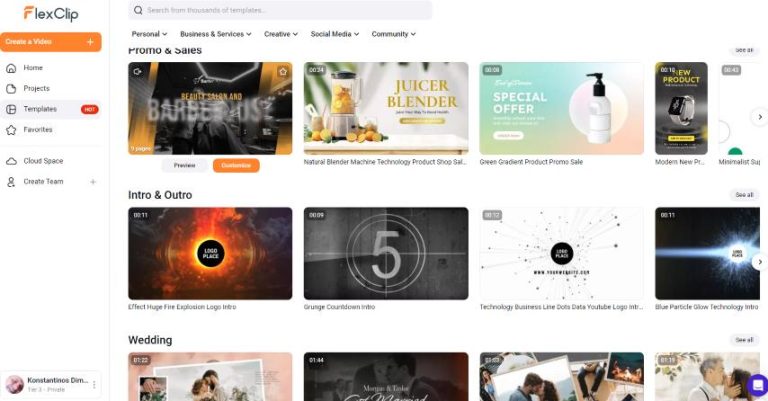
FlexClip offers a myriad of templates tailored for different purposes, including YouTube videos.Here’s how you can select one:
- From the dashboard, click on “Templates.”
- Filter templates based on categories such as “YouTube,” “Intro,” or “Promo.”
- Preview the templates and select one that fits your style or theme.
Step 3: Customize Your Template
Onc you’ve selected a template, it’s time to customize it to align with your brand:
- Edit Text: Click on the text boxes to modify the titles and descriptions automatically.
- Add Images and Videos: Upload your content or select from FlexClip’s extensive stock library.
- Adjust colors and Fonts: Personalize the aesthetic by changing colors, fonts, and sizes.
Step 4: Incorporate Music and Voiceovers
Great videos captivate through both visuals and audio. Here’s how to add audio:
- Navigate to the “Music” tab on the left side.
- Choose from royalty-free music clips or upload your own voiceovers.
- Ensure the audio is balanced with your video visuals for a seamless experience.
Step 5: Export and Upload to YouTube
Once you’re satisfied with your video, it’s time to export:
- Click the “Export” button located on the top right.
- Select your desired video resolution.
- After rendering, download the video file to upload it directly to your YouTube channel.
Step 6: Promote Your Video
After uploading your video, be proactive in promoting it. Share it across social media platforms, embed it in blogs, and interact with your audience to build engagement. Use SEO-friendly descriptions and tags to enhance its visibility on YouTube.
ready to start creating stunning videos for your YouTube channel? Explore all that FlexClip has to offer by clicking here!
FlexClip is an amazing tool that allows creators of all levels to produce high-quality videos effortlessly. Don’t hesitate to take action and learn more about this amazing video creation tool by visiting FlexClip.